Adding a blog
I’ve set up a place to jot down, little by little, the things I work on in day-to-day development — as a notebook. Nothing formal; partly a way to look back on my own work, written at an easy pace.
How it’s built
The homepage at https://nsys.dev prioritizes loading speed, keeping a perfect 100 on every PageSpeed Insights metric. I designed the blog on the premise that adding it would not break that.
- Pages are generated as static HTML from Markdown
- CSS is inlined into the HTML at build time, so external requests are zero
- No client-side JavaScript (even code highlighting is handled at build time)
Because it rides on the existing build foundation (Node + Docker), no new runtime or database was added.
Why I didn’t reach for a typical blog setup
When people say “blog,” the common picture is a CMS with a database, where you write and publish from an admin screen. That’s good at multi-author operations and dynamic features like comments and search; where it fits, it’s a very convenient system.
In short — a CMS is good at “running dynamically, with many people.” This time I prioritized “fast, simple, and writing that lasts,” so I chose a light, static setup. It’s not about better or worse, just fit.
The typical setup and this one differ in what they’re good at:
| Typical CMS + DB | This time (Markdown + static) | |
|---|---|---|
| Strong at | Admin UI, multi-author editing, comments and search | Speed, simplicity, long-term preservation of posts |
| Delivery | Generated on each view (dynamic) | Generated at build time (static) |
| Suits | Many editors, dynamic features needed | Solo writing, a speed-first notebook |
- What I gained: speed (100 on each metric) / a simple foundation / posts stay intact even if I change the mechanism
- What I gave up: the convenience of an admin UI / the dynamic features that come built in (comments, search)
“Posts stay intact” really is true: even when I revised the publishing mechanism on the homepage partway through, I didn’t have to touch the posts themselves. It’s not that a CMS is bad — it’s just that for this small notebook, this approach sat more naturally.
Tech stack
The main technologies behind the blog are below. Nothing special; I chose a setup that rides directly on the existing site’s foundation.
| Role | Technology | Notes |
|---|---|---|
| Delivery server | Go (standard library net/http) |
Serves static files. gzip and caching. No framework |
| Build | Node.js | Handles the pipeline that turns posts into static HTML |
| Markdown rendering | markdown-it | Renders post-body Markdown to HTML |
| Metadata parsing | gray-matter | Reads the front matter at the top of each post |
| Code highlighting | highlight.js | Colored at build time (no client JS) |
| Diagrams | Mermaid CLI | Diagrams rendered to SVG at build time (no client JS) |
| Minification | html-minifier-terser / Lightning CSS / esbuild | Smaller payloads for faster display |
| Containerization | Docker (multi-stage) | The runtime image is minimal, built FROM scratch |
| CI/CD | GitHub Actions | Auto build & deploy on push to main |
The key point is that coloring code and drawing diagrams are both done “at build time.” Because no extra JavaScript runs at view time, I can broaden what I express without slowing the page down.
How a post is written
You just drop a Markdown file into src/blog/posts/. At the top, you write the minimal metadata (front matter) used by the list and OGP.
---
title: Post title
date: 2026-06-09
description: A short summary used in the list and OGP
tags: [tag1, tag2]
---
- Required:
title,date(publish date; the list sorts by this, descending) - Optional:
description(shown in the list, OGP, search results),tags
After that, you just write the body in ordinary Markdown. Code blocks are colored at build time.
func handleHealthCheck(w http.ResponseWriter, r *http.Request) {
    w.WriteHeader(http.StatusOK)
    w.Write([]byte("OK"))
}
From writing to publishing
From writing a post to it going live looks roughly like this. Drop the Markdown and push, and the rest proceeds automatically. Updating a post doesn’t rebuild the app itself — only the content is built and delivered — so publishing is light and quick.
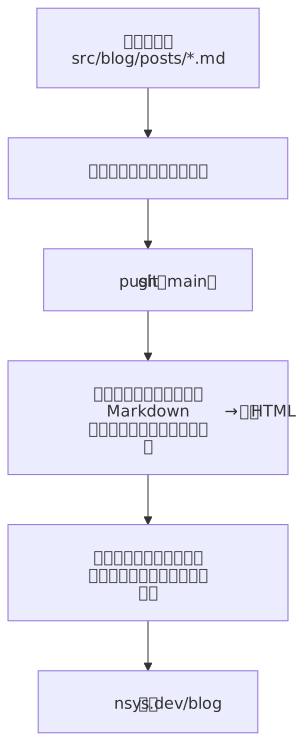
By the way, this diagram itself was written in Mermaid and converted to SVG at build time. Because it’s embedded as an image, there’s no extra client-side JavaScript and the page speed is unchanged.
Going forward
I’d like to write mostly about technical sticking points and how I worked through them. They’re modest notes from the range of work I’ve actually touched, but I’d be glad if they offer a clue to someone who got stuck in the same place.